Integrity Evidence, Not Accusations
Classla keeps a record of how work was done and puts it in one place, the Integrity panel on each assignment. On a lockdown assignment that is who left the test, when, how and for how long; on a coding block it is also every paste, the file history and how alike students' code is. There is no detector and no honesty score: every number is a fact about what happened, what it means is your call, nothing is ever penalized automatically, and no student sees any of it.
The Integrity Panel
Open Integrity from the rail beside an assignment, the shield at the end of the same row of buttons as Grader Panel. It is for you and your graders only. What it holds depends on the assignment:
- On a lockdown assignment, the Lockdown card at the top: every student who started, and what they did while locked in.
- On an assignment with coding blocks, one coding block at a time: its outside pastes and how similar each student's code is to the rest of the class.
An assignment with neither shows "No coding blocks in this assignment" and has nothing to record.
Lockdown Activity
Lockdown is set in the assignment's settings, as two switches: Hide the rest of the course and When a student leaves the tab, which is Allow, Warn and record or Pause until you let them back in. How they behave for the student is on the modes page. The Lockdown card is what you read afterwards.
Its first line counts the class, for example "24 students started · 3 left at least once · 1 needs release". Below it is one row per student who started, with where they are now: needs release, in lockdown, done once they submitted, or lifted if a teacher ended lockdown for them. When the tab is watched, the row also shows how many times they left and how long they were away in total. Students who need release come first.
Click a student to open their event log, one line per event with the time to the second:
- started, and submitted at the end.
- left, with how: tab hidden, window lost focus, full screen exited or tab closed. A hidden tab and a window that lost focus are different things to a teacher standing in the room, so they are kept apart.
- back after and how long, when they returned.
- paused, let back in, and lockdown lifted by a teacher.
- opened a second tab.
The card ends with the same caveat the product shows: "A lockdown event is not evidence of cheating. It cannot see a phone or a second device." Leaves shorter than a few seconds are not counted at all, so an accidental Alt-Tab or a notification does not show up.
The same record reaches the grader. A lockdown pill sits on each roster row, the status filter has Needs release, and each student's card shows "Left 2 times · away" and the time, with Let back in and Lift lockdown. For the class there are Let everyone back in and Lift lockdown for all. See Grading.
Coding Blocks
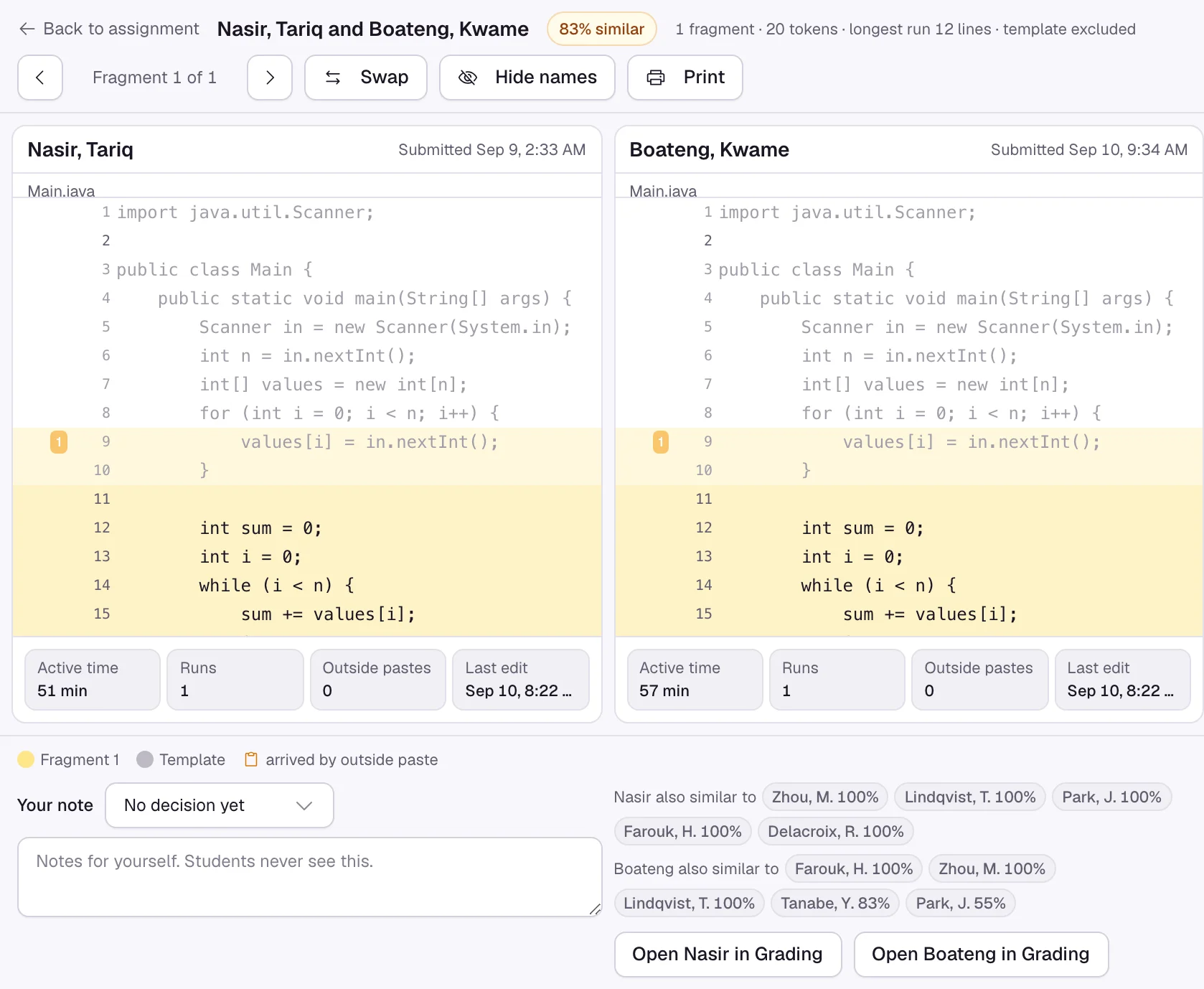
Every paste into a graded coding block is recorded, with where it came from, and a paste from outside the page is flagged on the roster (Pasted from outside) and at the top of the student's work. You can switch outside pastes off for coding blocks. Every file keeps its full history, and the Integrity panel compares each student's code on a block against everyone else's, with a side-by-side view of any pair, a private note, and a decision you record: No decision yet, Cleared, Discussed or Referred. All of it is explained, with its limits, in Grading code.
Group Contributions
On a partner-work assignment the panel opens with Group contributions: one card per group, with a bar for each member's share of the group's typing and of its time on the assignment. Hover a member for the raw numbers, or open Details for time, answer and code characters, edits and pastes side by side. Open in Grading takes you to the group's full Contributions table, question by question.
A handed-in group is marked Uneven contribution when one member typed under 15 percent of the group's characters and spent under 25 percent of its time, for a pair. Bigger groups scale the same way: under three tenths and under half of an even share. The card says "One member did much less of the typing and time. Worth a conversation." It is a prompt, not a finding: a student who talked the solution through while a partner typed shows few characters.
What It Does Not Do
- Nothing is scored, penalized or reported automatically. There is no cheating score and no threshold that does anything on its own.
- Pastes are recorded only in coding blocks. A paste into a short answer or any other block is not recorded or flagged, and blocking outside pastes applies to coding blocks only.
- Lockdown cannot see a phone, a second device or another monitor. Watching the tab needs Google Chrome on a computer or Chromebook, so it cannot start on an iPad or phone; Hide the rest of the course works on any device.
- The Integrity panel is for teachers and graders. Students never see it, the lockdown event log, paste flags or similarity.
- Classla does not record the screen, the camera, other browser tabs or keystrokes outside coding blocks.
- Paste content is kept, by decision, so you can still read a trail from months ago.