The Curriculum You Can Edit Mid-Unit.
Start from a prebuilt course, or from a blank page. Every lesson is blocks you can rewrite and publish to one section, or one student.
Camden Spehl, founder · 4 minute read
Who This Is For
You teach intro computer science or AP CSA, probably more than one section and possibly as the only CS teacher in the building. You want grading to take an hour, not an evening, your students to know what they got wrong while it still matters, and tomorrow's lesson to follow from how today went.
If you teach block-based coding to sixth graders, this is more than you need.
Half the Class Missed It. Reteach It Tomorrow.
When half the class fails the same check, I want to reteach it tomorrow.
Every submission is autograded as it arrives. Analytics give you the score spread, the average on each block, the tests that failed most, and active time per question.
Point the assistant at that and it drafts the follow-up into your editor, unpublished. Analytics alone are a report card. The follow-up is what gets the half that missed it caught up.
Or point the Claude you already use at the same class and ask it there. Read the docs.
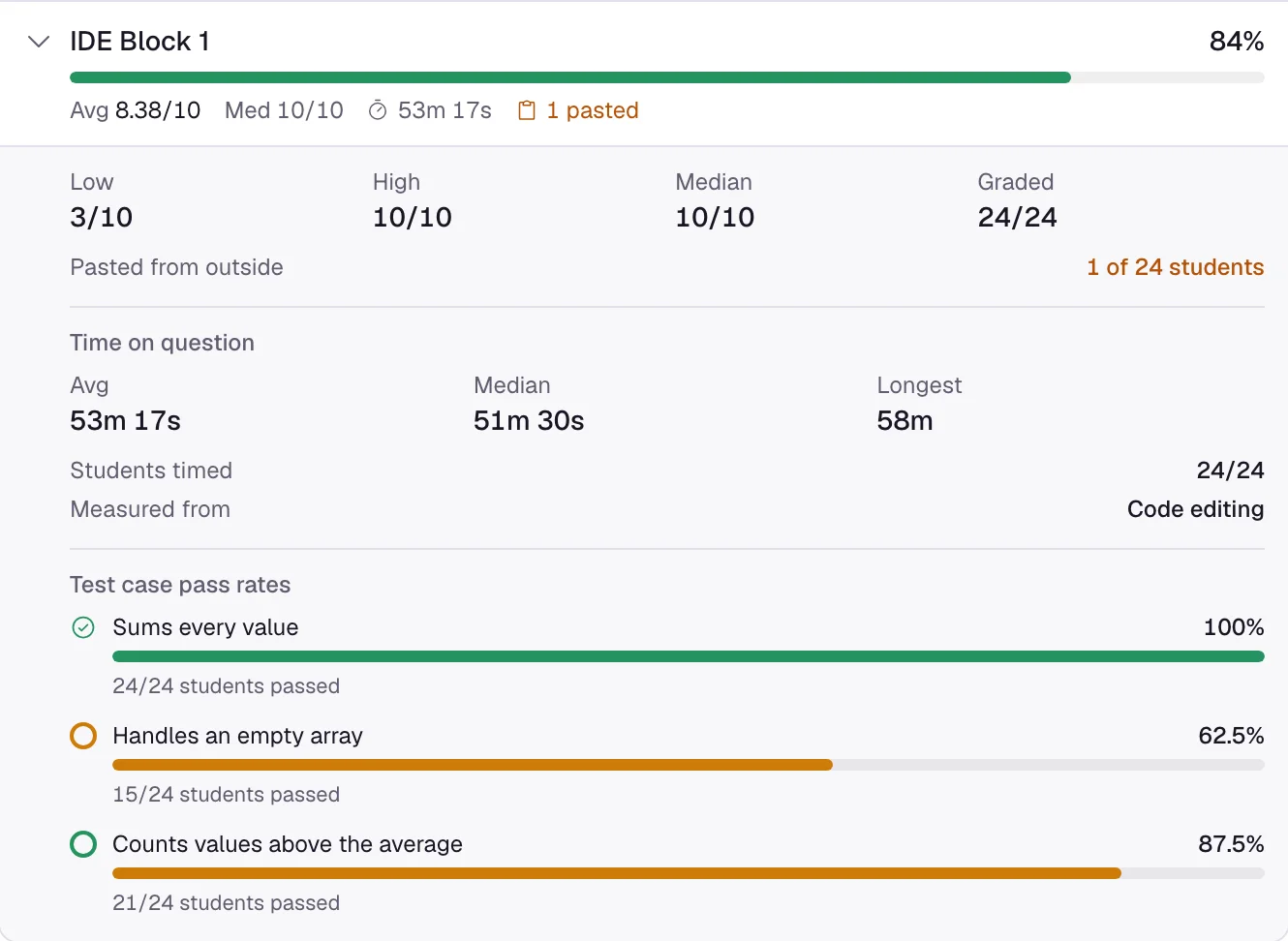
Six languages, each with both autograders. More than 2,000 CSAwesome assignments imported into Classla courses. Every file version, kept.
The Work Looks Too Good. Check the Record.
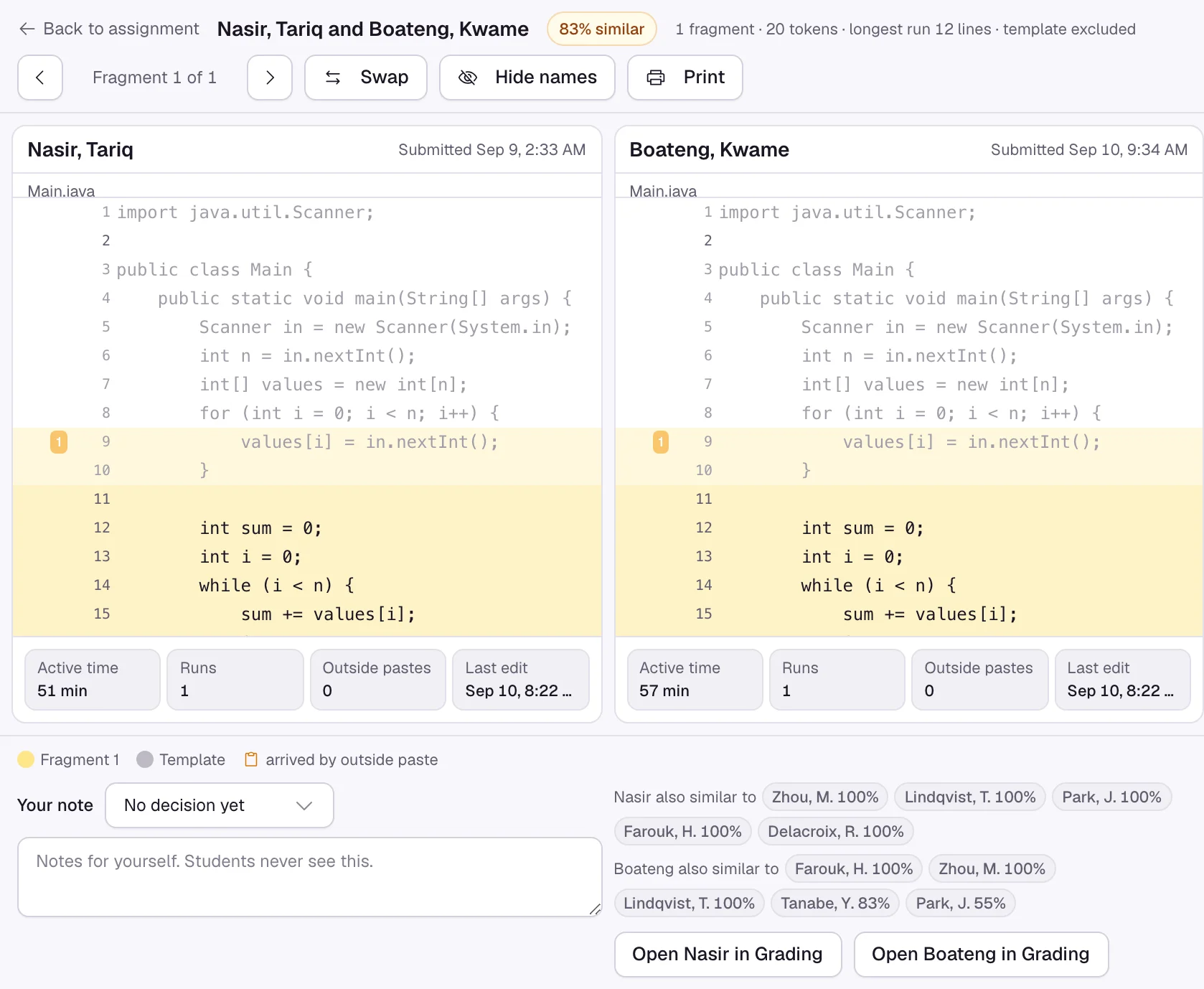
When a student says "I wrote it myself," I do not want to guess.
Classla records what was typed, pasted, and run in every graded coding block. No detector, no guess. Each paste is labelled by origin, and only outside pastes are flagged.
The integrity panel puts similarity, the edit timeline, and your decision in one place. An edit you or a TA make is recorded as yours. Nothing is penalized automatically.
One Student Is Out. Move One Date.
When one student is sick, I do not want to rebuild the assignment.
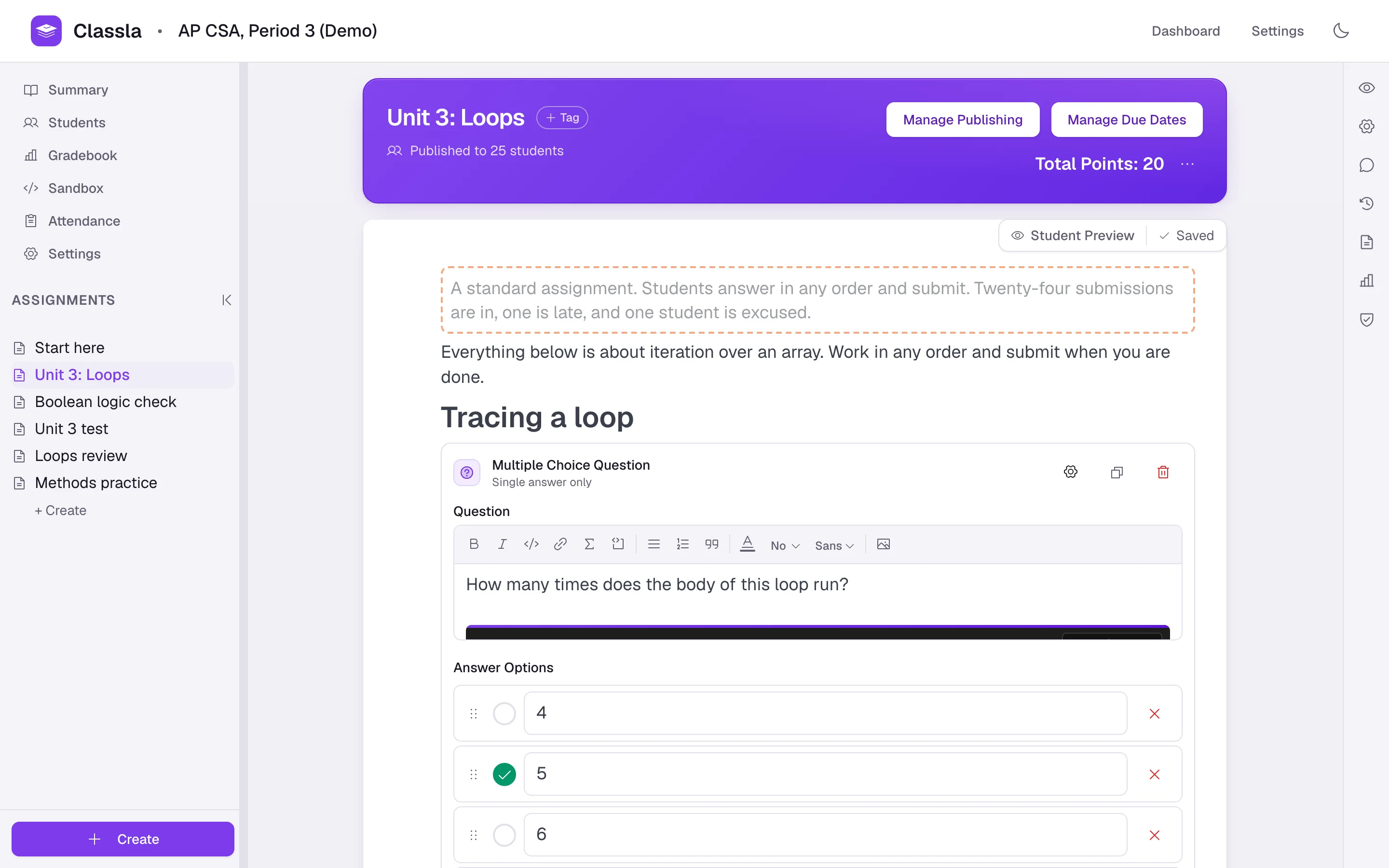
Sections live inside one course, each with its own join code. One Schedule dialog sets when an assignment opens, is due and closes, for the whole course, a section or a single student.
Timed assignments run a clock per student you can pause, resume, or extend. Excused is a real status; late is flagged, not penalized.
Thirty Submissions. See Them All at Once.
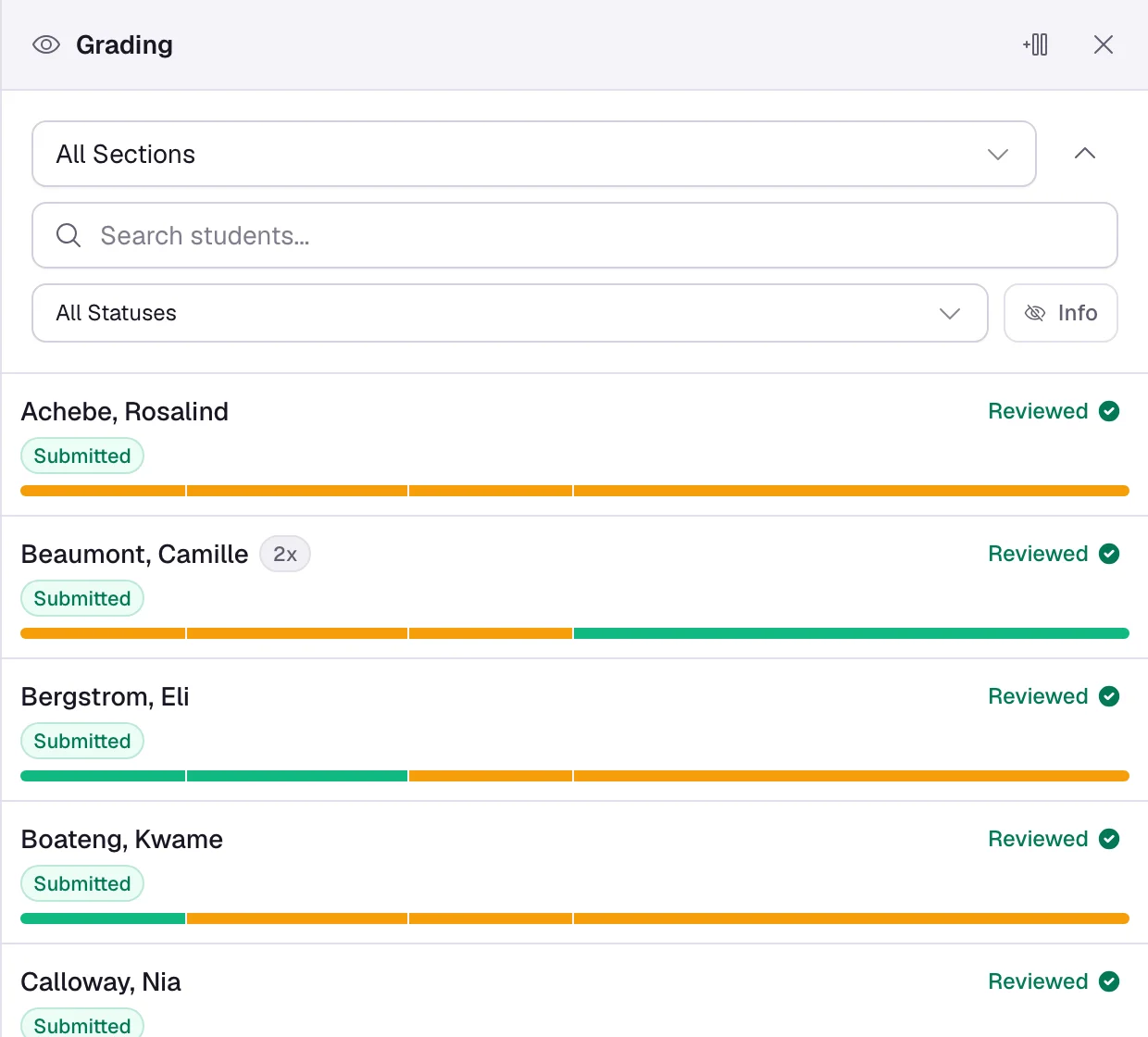
When I open the grader, I want to know where everyone is in ten seconds.
The roster lists every student behind a progress bar, one segment per graded block. Filter by section or status.
Autograder points and your judgment make one score, and a rubric total moves as you tick. An override survives a regrade, and the grid exports to CSV, Excel, or PDF.
The Bell Rings. One Tab Is Open.
When the bell rings, I want one tab open.
Attendance runs from a code on the projector, with present and tardy windows and an export. Every student gets a private Workspace, and you get a copy of their code to run.
Managed accounts need no email or real name. TA permissions are per course, and one editor holds every block type.
Link the course, or a section, to Google Classroom and published assignments post there with the due date and a link back. Work is turned in and graded here.
Write It Once, Run It Four Ways
The assignment you just wrote is also a quiz, a game and a test. Sequential shows it one question at a time. Lockdown keeps a class on it from Start to Submit. Go live turns its questions into a class game on the projector, and those answers are graded by the same graders and land in the gradebook with no extra step. Nothing is copied, converted or re-authored, and when the game ends the assignment is what it was.
Two things to know first. Live plays the questions students answer on screen, and polls, so text, images and photographed work are not rounds. Sequential paces the browser and lockdown is a deterrent that needs Chrome, so neither one is a security boundary on its own.
If You're Coming from JuiceMind, CodeHS, or Codio
You already know the shape: a browser IDE with nothing to install, assignments that grade themselves as the code runs, and one place to see the whole class. CodeHS, Codio and JuiceMind all do that, and Replit's Teams for Education did until it closed in 2024. Classla does it too, so that is not the reason to move.
What Is Different Here
- Every lesson is blocks you rewrite, the prebuilt ones included, and an empty course is a normal start.
- Due dates and publishing reach a single student, so a makeup quiz needs no duplicate course.
- Paste trail, similarity and the edit timeline in one panel, with your decision written down.
- Attendance in the same course as the lessons and the gradebook.
- An assistant that reads your class's submissions and drafts the follow-up, unpublished.
Anything they have that Classla does not, ask for it. Most requests ship within days.
Questions Teachers Ask
- Do I have to use your curriculum?
- No. Verified teachers get a full AP CSA course and review sets for AP CSA and AP Calculus, every lesson editable blocks. Plenty of teachers start from an empty course.
- Why do you verify teachers?
- A new account can explore everything, but it cannot run a real class until a person at Classla has looked at it. Until then a course holds up to five students. It usually takes a day.
- What about student privacy?
- A student account needs a username and a password. Nothing else. No analytics, no advertising, no tracking pixels. We sign your district's data privacy agreement. Rosters come from a join code, a list of names, or Canvas and Moodle, and Clever rostering is coming. The rest is in the Privacy Policy.
- Can I take my work with me?
- Yes. Export grades any time, and ask for a full copy of your data whenever you want one. If Classla ever shuts down, every school gets its data and course content first.
- Is this surveillance?
- It records edits, pastes, and runs inside coding blocks. Not keystrokes, not other tabs. Students never see the integrity panel.
- Is the AI going to write slop?
- It drafts into your editor, unpublished, and never talks to students.
- Does AI grade my students?
- No. Code and answers are graded against your answer key and your tests, not by AI. Handwritten work is graded by you: you check off the rubric items you wrote for each question.
- What does it cost?
- $15 per student per school year for a K-12 school, paid by the teacher or the school. $30 per student per semester for a college, paid by the student or the department. Everything is included. Details are on Pricing.
- What if Classla has a bug, or doesn't do what I need?
- I build it and ship most weeks, out of conversations with the teachers using it. A bug is usually gone the same week. Need a language, a block type, a grading step, or an integration? Ask, and it usually lands within days. Write to camden@classla.org.
Try It, or Tell Me What I Got Wrong
Free to explore. Classes open once we verify you teach, usually the same day.
Thought "that is not my problem, this is"? Write to camden@classla.org. Pricing.
CSAwesome is used under CC BY-NC-SA 4.0.